Cracking the WHOOP 5.0 over Bluetooth

I own a WHOOP band. It reads my heart rate about a hundred times a second, tracks how I sleep, and decides every morning whether I’m “recovered.” All of that lives in WHOOP’s app and WHOOP’s cloud, behind a subscription. The data is about my own body and I can barely touch it.
Someone had already fixed this for the older band. John Middleton built my-whoop, an open-source, local-first client that reads a WHOOP 4.0 over Bluetooth and keeps everything on your own hardware: the app, the decoding, the storage, all of it.1 I have a 5.0. When I pointed his client at it, every channel went dark. Getting it talking again, and getting the biometric stream out, is the story. The 4.0 groundwork is John’s. The 5.0 work below is mine, built on top of his.
This is the technical writeup. If you’d rather poke at the protocol than read about it, I built an interactive playground where you can decode and build real 5.0 frames in the browser, take apart a biometric packet, and watch the checksums update as you type. The full spec lives there too.
A quick Bluetooth primer
Skip this if you’ve written BLE code before. If you haven’t, four words show up constantly below and they all map onto things you already know from the web.
A Bluetooth Low Energy device acts like a tiny server. It has no URLs. What it has instead are characteristics, which are closer to individual fields you can hit. Some you read. Some you write to. A few you can subscribe to, and those are called notify characteristics. Subscribe to one and the device pushes you a fresh value every time it has a new one, no polling involved, which is how a band feeds you a heart rate twice a second without you asking each time. Characteristics that belong together get bundled into a service with its own long UUID. The spec has a name for this whole scheme, GATT, and that’s genuinely the last time you need to think about that acronym.
The word that actually matters here is bond. Before a phone can touch most of a band’s characteristics, the two have to pair and then bond, which is roughly Bluetooth’s version of a TLS handshake with a “remember this device next time” step attached. And pairing has two strengths, which turns out to be the whole story of this post. The weak one is called “just-works”: it brings up an encrypted link without either side proving who it is, the way HTTPS behaves if you switch certificate checking off. Encrypted, but you can’t be sure who’s on the other end. The strong one is authenticated, and it also defends against someone wedged in the middle pretending to be one of the two devices. Every characteristic is tagged with how strong a bond you need before it will answer you, and that tag is the difference between the 4.0 and the 5.0.
The 4.0 was a pushover
WHOOP 4.0 exposes a custom service. You connect, you do one “just-works” write to its command characteristic, and iOS quietly brings up an encrypted link. After that the band streams: live heart rate, R-R intervals (the gaps between consecutive beats, which heart-rate variability is computed from), events, and a fourteen-day backlog of stored biometrics that the recovery and strain and sleep numbers are derived from. No passkey, no pairing dance. The whole “bonding trick” is a single write.
John’s client does all of that already: live heart rate on screen, history backfilling, the whole pipeline from band to local store. Then I pointed it at a 5.0 and every channel went dark.
The 5.0 wall
The 5.0’s custom service looks familiar at first. Same shape as the 4.0: one characteristic you write commands to, several you subscribe to for pushed data, all under a renamed UUID.
fd4b0001-cce1-4033-93ce-002d5875f58a   (custom service)
  fd4b0002   write                → command channel
  fd4b0003   notify               → command responses
  fd4b0004   notify               → events
  fd4b0005   notify               → data / fragmented
  fd4b0007   notify               → new in 5.0
The familiarity ends the moment you touch it. Every attempt to subscribe or write comes straight back as a refusal from the Bluetooth stack itself, before the band’s own software ever sees the request:
subscribe fd4b0003     → Code 15  Encryption is insufficient
subscribe fd4b0004/5/7 → Code 5   Authentication is insufficient
write     fd4b0002     → GATT     Insufficient Authentication
The exact wording matters. “Encryption is insufficient” would mean an ordinary encrypted link is enough. “Authentication is insufficient” is stricter: it wants the authenticated pairing from the primer, the kind that’s protected against a man-in-the-middle, not just-works. The 4.0 handed over biometrics on a just-works link. The 5.0 demands the strong handshake before it will so much as acknowledge a subscription.
I spent a while trying to make a Mac complete that handshake, because a Mac is where my tooling lived. Dead end, and worth saying plainly so nobody else burns the same day on it.2 Apple’s Bluetooth API on macOS gives you no way to initiate pairing directly. It will only pair as a side effect of reading an encrypted value, and the 5.0’s custom service has nothing readable to trigger that: the command characteristic is write-only, the rest are push-only, and the plain readable values aren’t encrypted. I even unpaired the band from the phone and tried six times from scratch to rule out the obvious “some other device is holding the only allowed bond” theory. Same refusal every time, and not once did the OS even show a pairing prompt. The band simply won’t do a standard Bluetooth pairing with an arbitrary computer. Its custom service authenticates through WHOOP’s own app and account, not through anything a generic client can drive.
What you get for free
Before going further it’s worth knowing what the 5.0 hands out with no bond at all. Bluetooth defines a handful of standard services that almost every device implements the same way, so any app can read them with no special knowledge and, here, no pairing:
- Heart Rate (service
0x180D, characteristic0x2A37). A standardized format: a flags byte, then the heart rate, then R-R intervals when the flags say they’re present. I was decoding live heart rate off this within minutes, using the same standard-profile parser John’s client already had for the 4.0. - Battery (
0x180F/0x2A19). A percentage. - Device Information (
0x180A). ModelMG, hardwareWS50_r03, firmware50.38.1.0.
That is a genuinely useful live feed and it costs nothing. But it’s shallow. No motion data, no raw optical heart-rate signal, and none of the stored biometric history the real metrics are built from. Everything with depth sits behind the authenticated bond.
The phone already holds the key
Here is the thing the Mac was missing. The official app, with my consent, during normal setup, already paired the band to my iPhone. iOS holds that bond at the system level. And an app running on that same phone inherits the encrypted transport.
So I stopped fighting the bond and just rode the one that already existed. An app on the bonded phone subscribed to the custom notify characteristics, and the band accepted every one:
FD4B0003 SUBSCRIBED — band accepted standard pairing
FD4B0004 SUBSCRIBED
FD4B0005 SUBSCRIBED
FD4B0007 SUBSCRIBED
No keys forged, no app auth impersonated. The OS bond established by the official app provided the encrypted link, and my app listened on it. Passive capture of traffic between two of my own bonded devices.
And then almost nothing happened.
Silence
Subscribing opens the pipe. It does not make the band talk. Over the next several minutes exactly one frame arrived, on the events channel, and then nothing. The 5.0 behaves like the 4.0 in this respect: it is mute until something commands it to stream. The bond was never the whole problem. The other half is a command protocol I didn’t have, and the 5.0’s is not the 4.0’s.
I had two ways to learn that protocol. Guess it by poking the command characteristic and watching for reactions, which is slow and risks doing something destructive to a device I like. Or observe the official app speaking it once, cleanly, and read the conversation back.
Reading Bluetooth without a sniffer
The obvious move is a Bluetooth sniffer: some radio dongle yanking packets out of the air, followed by a lot of work to decrypt them. I didn’t do that. The whole trick is choosing where you tap.
Inside the phone, the Bluetooth software and the actual radio chip talk over an internal interface called HCI. Encryption gets applied below that line, on the chip, in the last instant before the bits hit the antenna. So whatever you log at HCI is caught before it was ever encrypted on the way out, or after it was already decrypted on the way in. Plaintext in both directions, no keys required.
iOS will just hand you that log. Apple publishes a configuration profile for debugging Bluetooth; you install it, do the thing you want recorded, and then pull a sysdiagnose, which is the giant diagnostic bundle the OS coughs up on demand. Somewhere inside it is a full capture of every Bluetooth message the phone sent and received. The first time you find it sitting there in the clear, it feels like cheating. It’s much closer to reading your own server’s request log than to wiretapping anybody.3
So I opened the WHOOP app, let it sync the band for a few minutes, and captured the whole exchange. One good capture: 8,031 frames on the custom service. That capture is the Rosetta stone for everything below.
The envelope
A parser written against a capture is only worth trusting if it can turn around and reproduce the capture. So the rule I held myself to from the start: decode every frame, re-encode it from the decoded fields, and require the re-encoded bytes to equal the originals. All 8,031 of them. If one frame failed to round-trip, the format was wrong. That constraint is what turned a pile of guesses into a confirmed spec.
The frame envelope that satisfies it, with multi-byte numbers stored low byte first (little-endian, the same convention x86 and ARM use in memory):
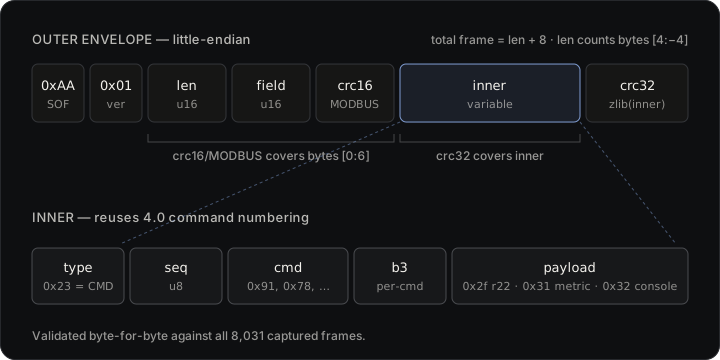
[0xAA][0x01][len u16][field u16][crc16 of bytes 0..6][inner …][crc32 of inner]
A few of those fields took real work.
len counts from byte 4 to four bytes before the end, so the total frame is len + 8. Easy once you stop assuming it counts the whole thing.
The checksums were the interesting part. A CRC is a checksum: a number computed from a run of bytes so the receiver can tell if any of them got corrupted in transit. This frame carries two of them, over two different regions, computed with two different algorithms, and you have to match each one exactly or your frames look broken. The trailing four bytes are a standard zlib CRC-32 (the same one in gzip and PNG) over the inner region, which the 4.0 also used, so I recognized it fast. The header check resisted. It’s two bytes covering the first six bytes of the frame, and none of the common CRC-16 variants matched until I ran the whole catalog of them and landed on the one labeled CRC-16/MODBUS. The parameters that define it, if you want to reproduce it, are polynomial 0x8005 reflected, initial value 0xFFFF, input and output reflected, no final XOR. In Swift, which is the version that ships:
/// CRC-16/MODBUS (poly 0x8005 reflected, init 0xFFFF, refin/refout, xorout 0).
static func crc16Modbus(_ bytes: ArraySlice<UInt8>) -> UInt16 {
    var crc: UInt16 = 0xFFFF
    for b in bytes {
        crc ^= UInt16(b)
        for _ in 0..<8 {
            crc = (crc & 1) != 0 ? (crc >> 1) ^ 0xA001 : (crc >> 1)
        }
    }
    return crc
}
The field word at bytes 4 and 5 is a small control value, not covered by either checksum, usually 00 01 on the wire for commands. I still don’t have a complete story for every value it takes, and I’m honest about that in the code.
The inner layout, and a gift from the 4.0
Unwrap the envelope and the inner bytes are [type][seq][cmd][b3][payload]. The pleasant surprise: the 5.0 reuses the 4.0’s command numbers. type 0x23 means COMMAND. The command bytes I’d already seen on the 4.0 were right there: 0x91 GET_HELLO, 0x8d GET_ADVERTISING_NAME, 0x22 GET_DATA_RANGE, 0x78 SET_CONFIG, 0x16 and 0x17 for the historical send-and-ack loop. Whoever built the 5.0 firmware kept the command vocabulary and rebuilt the frame around it.
The one byte that bites you is b3, the fourth inner byte. It is not constant. It varies per command, and the band is picky: send GET_HELLO with the wrong b3 and you get nothing. GET_HELLO, GET_ADVERTISING_NAME, and SET_CONFIG want 0x01. GET_DATA_RANGE and SEND_HISTORICAL want 0x00. Get it wrong and the band just ignores you, which is the worst kind of bug because there’s no error to chase.
Making it stream
The official app’s path from silence to a firehose of biometrics, reconstructed from the capture:
GET_HELLO, thenGET_ADVERTISING_NAME.- Fifteen
SET_CONFIGwrites, each one a feature flag. This is the step that actually unlocks the data. The payload is a feature name padded to 32 bytes, a one-byte value, then padding. The names read like exactly what they are:enable_r22_packets,enable_r22_v2/v3/v5/v6/v8_packets,make_hrfm_visible,hr_ch_switching,enable_passive_strap_fit_gen5,enable_sig11_during_sleep, and a handful more. GET_DATA_RANGE, then aSEND_HISTORICALand a continuing ack loop.
Flip those flags and the band opens up the r22 stream: inner type 0x2f, arriving on the data characteristic at a serious clip. About 6,300 frames a minute once it’s going. That is the high-rate biometric channel the whole exercise was after.
Getting from “it works in the capture” to “it works in my app” cost a few debugging cycles that are worth keeping, because every one of them was a silent failure with no error attached.
The band buzzed every time I connected. I had a command in my enable sequence I’d labeled SET_CLOCK, opcode 0x42, because that’s roughly what it does on the 4.0. On the 5.0, 0x42 is SET_ALARM_TIME, and writing it set an alarm that buzzed the band on my wrist on every single connect. Deleting one command made the buzzing stop. Naming things matters even when the things are bytes.
Write-without-response is a no-op. I started with write-without-response for the command writes because it’s cheaper. The band silently ignores them. It only acts on write-with-response. There is no error. The writes just evaporate. Switching to write-with-response is what made the frames finally come fast.
The stream stalls after one chunk unless you ack it. This was the good one. The r22 data starts, delivers one chunk, and stops. The trick is in the metadata frames the band interleaves with the data: every status frame of a particular subtype carries an 8-byte progress cursor buried at offset 13. You have to echo that cursor straight back as a 0x17 command, verbatim, and only then does the band send the next chunk. I confirmed it the satisfying way: in the capture, all 124 acks the app sent were byte-identical to the cursor in the status frame right before each one. Echo the cursor, the offload flows. Don’t, and it dies after one chunk.
// On each status frame carrying a cursor, echo it back as a 0x17 ack
// or the historical offload stalls after the first chunk.
let cursor = Array(frame.inner[13..<21])
sendGen5(cmd: 0x17, b3: 0x01, payload: cursor)
r22 only flows on-wrist. I lost an hour to this one. With everything correct, on-wrist gating means the band won’t emit r22 at all unless it’s actually being worn. Off-wrist you get heartbeat and console frames and nothing else. The fix was to put it on and stop overthinking the code.
Reading the sensor bytes
The r22 frames are mostly a 112-byte variant. The trick to reading an unknown binary payload is to find the bytes that move the way a real quantity should, so you watch them over time and against the physical world. The fields that gave themselves up, counting bytes into the payload:
- Bytes 7 through 10 are a timestamp, the band’s own clock, ticking once per second.
- Byte 14 is heart rate in beats per minute. Byte 29 is a second heart rate, which fits one of the feature flags being named
hr_ch_switching. The two stay within a few bpm of each other, sit in a believable physiological range, and drift smoothly across forty minutes of capture, matching the standard heart-rate profile from earlier. - Bytes 37, 41, and 45 are three ordinary 32-bit floating-point numbers: the accelerometer’s x, y, z, in multiples of gravity. The giveaway that it really is an accelerometer is that at rest the three combined have a length of about one (that’s gravity, one g, pulling straight down), and the direction swings around as you tilt the band. Three unrelated floats would not do that.
I’ll admit to one wrong turn, because it’s a good lesson. I first read a block starting at byte 33 as an orientation quaternion, the four-number form 3D software uses to store which way something is facing. Four floats there had a combined length very close to 1, which is exactly what a valid orientation quaternion looks like, so it seemed like a lock. It was a coincidence. One of those four bytes was a separate value that happened to sit near zero, which dragged the combined length close to 1 for the wrong reason. The real signal was the accelerometer a few bytes further on. A length near 1 was suggestive, not proof. Watching the values respond correctly when I physically rotated the band is what counted as proof.
Where it stands
The 5.0 now connects, bonds through the phone’s existing OS bond, replays the enable handshake, and streams the r22 biometric channel at thousands of frames a minute, with the ack loop keeping the offload alive. Live heart rate, R-R, and battery flow into the same store and the same views John’s client already had for the 4.0, so the 5.0 lights up the existing app instead of needing a new one. The codec round-trips all 8,031 captured frames byte for byte and is unit-tested against them.
I’m equally clear about what isn’t done. Two layers of sensor data are still raw. Fully calibrated motion (knowing which axis is which and in exactly what units) and the raw optical heart-rate waveform (the green-light signal a wrist sensor actually reads, known as PPG) both need labeled captures to finish: recordings where I do something known on cue, like hold still, then move, then cover and uncover the sensor, so the bytes can be lined up against ground truth. That’s the same labeled-capture method earlier work used on the 4.0’s sensors, and it’s the next layer here. And recovery, strain, and sleep stay scores WHOOP computes. I’m reading the inputs to those models, not re-deriving the models themselves. The honest summary: the connection and the protocol are solved and shipped, and the fine sensor calibration is in progress.
The whole point was never the 5.0 specifically. It was that the data my own body produces should be readable by software I run, on hardware I own, without asking anyone’s cloud for permission. Getting there meant defeating an authenticated bond and reversing a frame format just to read a pulse off my own wrist, which is satisfying and a little absurd in equal measure. Both bands now do it.
If you want to actually talk to a 5.0, the whole protocol is written up as an interactive spec and playground: the GATT map, the command set, the enable sequence and r22 field layout, plus live tools to decode and build frames yourself. It runs entirely in your browser.
This WHOOP work is independent and unofficial, not affiliated with, endorsed by, or sponsored by WHOOP, Inc. “WHOOP” is a trademark of its owner, used here only to name the hardware this software interoperates with. It is reverse-engineering for interoperability with a device I own, reading my own data, a protected interest under 17 U.S.C. §1201(f). No proprietary software, firmware, or assets are reproduced, and no access control, DRM, or paywall is circumvented. It is not a medical device, and heart rate, HRV, recovery, and the rest are approximations, not medical advice.
-
And John’s client itself stands on earlier community reverse-engineering of the WHOOP protocol, without which none of this exists: whoomp, whoop-reader, openwhoop, and reverse-engineering-whoop. My 5.0 work is one more layer on that stack. ↩
-
Every legitimate macOS lever, in one place, for the curious: the Python BLE library’s
pair()call isn’t implemented on macOS at all; no readable-encrypted value exists to trigger an auto-pair; subscribing or writing returns the auth error with no pairing prompt; the system showed no leftover bond to clear; and unpairing from the phone plus six fresh attempts changed nothing. macOS never completes the low-level pairing exchange (SMP, the Bluetooth pairing protocol) with this band. ↩ -
The capture is of my own phone talking to my own band, with the official app, during a normal sync I initiated. No third party’s traffic, no circumvented access control. HCI logging is a documented Apple developer facility. The raw capture stays on my disk and is gitignored; what’s published is the protocol structure, not the bytes of my sessions. ↩